![[logo]](logo.png)
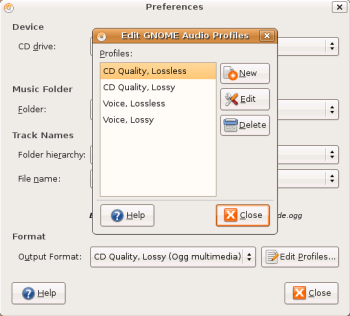
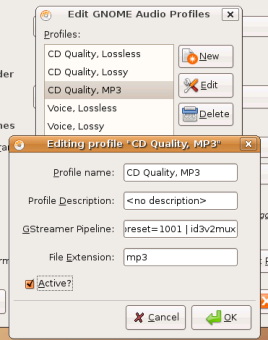
If you intend to rip CD's to one of these proprietary formats, an extra step is required to get the default CD ripper (Sound Juicer) working. Start up Sound Juicer from the menu Applications.. Sound and Multimedia.. Sound Juicer. On the menu select Edit.. Preferences. Under the "Format" section click the "Edit Profiles" button. On the resulting dialog, click the "New" button. Put in "CD Quality, MP3" for the profile name and click the "Create" button. Select the newly created profile in the profile list and click the "Edit" button. In the resulting dialog put the following string in the "GStreamer Pipeline" field
audio/x-raw-int,rate=44100,channels=2 ! lame name=enc preset=1001 ! id3v2muxIn the "File Extension" field put "mp3" and then check the "Active" checkbox. Now click "Ok" then "Close". Now here's an oddity.. on my machine (and probably yours as well) the newly created profile doesn't show up until I close Sound Juicer completely and then start it up again. So, close out of Sound Juicer, then start it back up as before and go to the Preferences dialog. Once there, select your newly created profile (CD Quality, MP3) in the "Output Format" combobox and click "Close". Now you should be ripping CDs into the MP3 format.
 |
 |